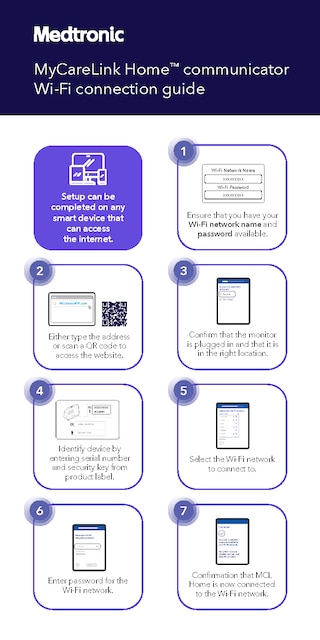
PDF download of MyCareLink Home™ communicator Wi-Fi connection guide.

Remote monitoring

The MyCareLink Home™ non-wireless communicator makes it easy to stay connected with your clinic.1 It sends important information from your heart device using Wi-Fi or a cellular signal. Setup is simple,2 and the communicator can switch between networks automatically3 so you stay connected and supported in your care.
Medtronic recommends that you connect the communicator to your home Wi-Fi network to ensure a robust connection to support your care.

Setup can be completed on any smart device that connects to the internet, like a phone, tablet, or computer.

Ensure that you have your Wi-Fi network name and password available.


Confirm that the monitor is plugged in and that it is in the right location.

Identify device by entering serial number and security key from product label.

Select the Wi-Fi network to connect to.

Enter password for the Wi-Fi network.

Confirmation that MyCareLink Home™ communicator is now connected to the Wi-Fi network.

1-888-660-4616 (Toll Free)
Monday - Friday,
9 am to 5 pm Eastern Standard Time
You just clicked a link to go to another website. If you continue, you will leave this site and go to a site run by someone else.
Medtronic Canada does not review or control the content on the other website, and is not responsible for any business dealings or transactions you have there. Your use of the other site is subject to the terms of use and privacy statement on that site.
It is possible that some of the products on the other site not be licensed for sale in Canada.
