PDF download of MyCareLink Home™ communicator Wi-Fi connection guide.

Remote monitoring

The MyCareLink Home™ non-wireless communicator makes it easy to stay connected with your clinic.1 It sends important information from your heart device using Wi-Fi or a cellular signal. Setup is simple,2 and the communicator can switch between networks automatically3 so you stay connected and supported in your care.
Medtronic recommends that you connect the communicator to your home Wi-Fi network to ensure a robust connection to support your care.

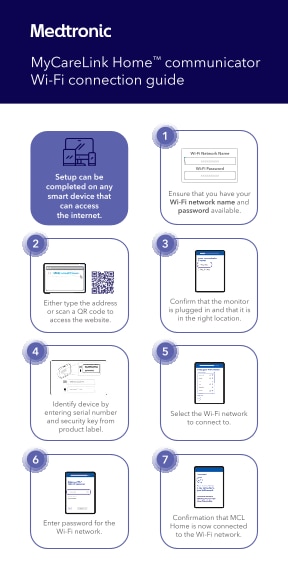
Setup can be completed on any smart device that connects to the internet, like a phone, tablet, or computer.

Ensure that you have your Wi-Fi network name and password available.


Confirm that the monitor is plugged in and that it is in the right location.

Identify device by entering serial number and security key from product label.

Select the Wi-Fi network to connect to.

Enter password for the Wi-Fi network.

Confirmation that MyCareLink Home™ communicator is now connected to the Wi-Fi network.

Questions about your monitor:
Phone: 866-470-7709
Monday–Friday
7 a.m.–7 p.m. CT